Releasing · HarborPilot
Shipping betas with release tracks
A track is who a release goes to. Every app starts with Stable, which goes to everyone. Add a Beta track and you can send test builds to the people who asked for them while everyone else stays on Stable. This guide adds a Beta track to Tidemark.
By Francisco Cantu ·
Channel or separate feed
A Beta track can reach testers in one of two ways:
- A channel in your app's feed (recommended). Beta releases go in the same
appcast.xml, marked with a Sparkle channel such asbeta. Only copies that opt in to that channel see them. Testers use the same app; they just turn on beta updates. - A separate feed. Beta releases get their own folder and
appcast.xml, and a build configuration of your app points at that feed instead. Use it when testers run a different build, such as a Beta configuration.
1. Add the track
Open App Settings → Build and click Add Track…. (Once you add a track, that tab is called Tracks.)
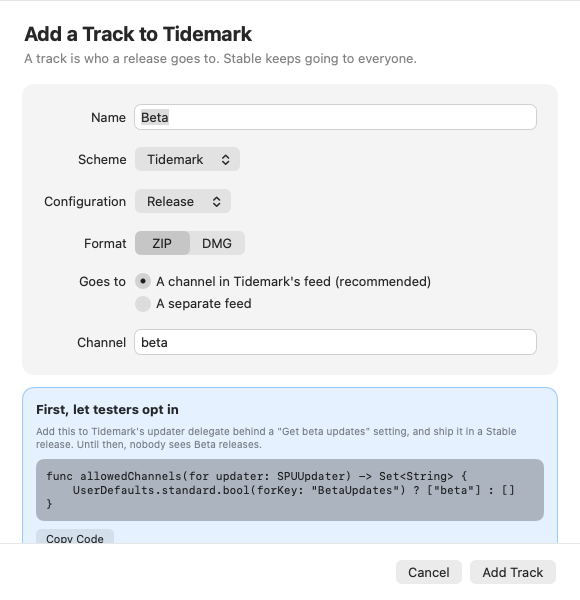
- Name: Beta by default. If a build configuration has the same name, HarborPilot picks it.
- Scheme, Configuration, Format: what to build, and ZIP or DMG.
- Goes to: a channel in your app's feed, with the channel's name, or a separate feed with its own upload folder. The folder has to be HTTPS and different from every other app's feed and your app's own.
For a separate feed, HarborPilot makes one change to your project: it points that configuration's SUFeedURL at the new feed. Review the Change shows it first, and it's backed up for Undo like every other edit.
Where a track goes is fixed once it's added. To send it somewhere else, remove the track and add it again.
2. Let testers opt in (channels only)
Sparkle only shows channel releases to copies that ask for them. HarborPilot shows the code to add to your app's updater delegate, with Copy Code:
In your SPUUpdaterDelegate
func allowedChannels(for updater: SPUUpdater) -> Set<String> {
    UserDefaults.standard.bool(forKey: "BetaUpdates") ? ["beta"] : []
}
Add a “Get beta updates” setting to your app that turns that key on, and ship it in a Stable release first. Until people have a version with the setting, nobody sees Beta releases. HarborPilot doesn't write this code into your project.
3. Release to a track
With tracks, the release sheet has a Stable / Beta picker in its corner, and the button says where it's going: Build & Release to Beta. The line under it says who gets it, such as testers who turned on beta updates.
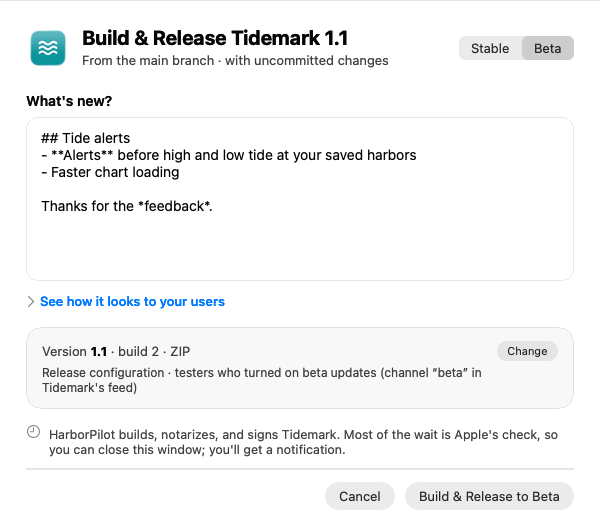
A beta's suggested version is the next Stable version, and the shared build number tells betas of the same version apart. Each Beta release also makes Tidemark-beta-latest.zip, a link that always gets the newest beta, while Tidemark-latest.zip stays on Stable.
4. Watch both tracks from home
Your app's home shows a row per track: what's live on each, and a Build & Release button for each.
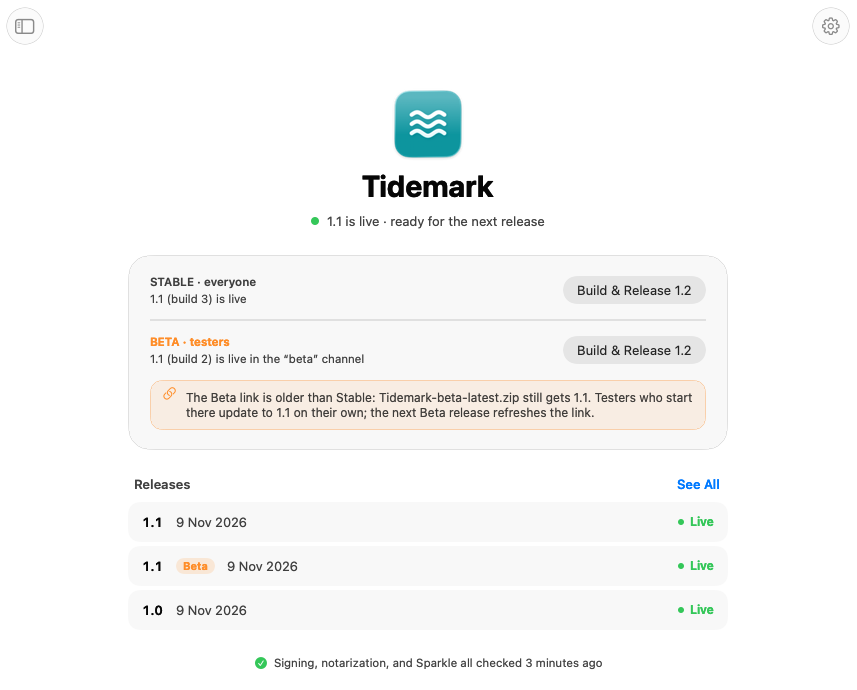
A release waiting for upload blocks only its own track. You can still ship a Stable fix while a beta waits. If Stable moves ahead of Beta, home notes that the Beta link still gets the older build; testers who start there update to Stable on their own, and the next Beta release refreshes the link.
Removing a track
Select the track in App Settings and click Remove Beta…. Beta releases stay in History and in the feed, so testers keep the build they have and move on when a newer Stable build comes out. Your Xcode project isn't changed. If it was the only track you added, your app goes back to just Stable.

Simplify your next release with HarborPilot.
Tracks let you try a change with a few people before everyone gets it, without a second app, a second key, or a second release routine. See shipping your next update for the release itself.
Sources and further reading
Service limits and Apple requirements can change. Check the linked documentation before publishing. HarborPilot is not affiliated with Apple, Cloudflare, or the Sparkle project.