Troubleshooting · HarborPilot
When the live check fails
After you upload a release, HarborPilot downloads your feed and files from your own address and confirms they're exactly the ones it built. When something's off, it shows one card that says what it found and how to fix it. This guide explains each one.
By Francisco Cantu ·
How the check works
HarborPilot checks in a fixed order: first the feed, appcast.xml, then each archive, the versioned one and then -latest.zip. For each archive it checks the size, then downloads it and compares its checksum. It asks your host not to send a saved copy.
The check stops at the first problem, so you only ever see one card. Most cards have Show Me How for the steps, and every card has Check Again to run it again and Details for what your host actually answered.
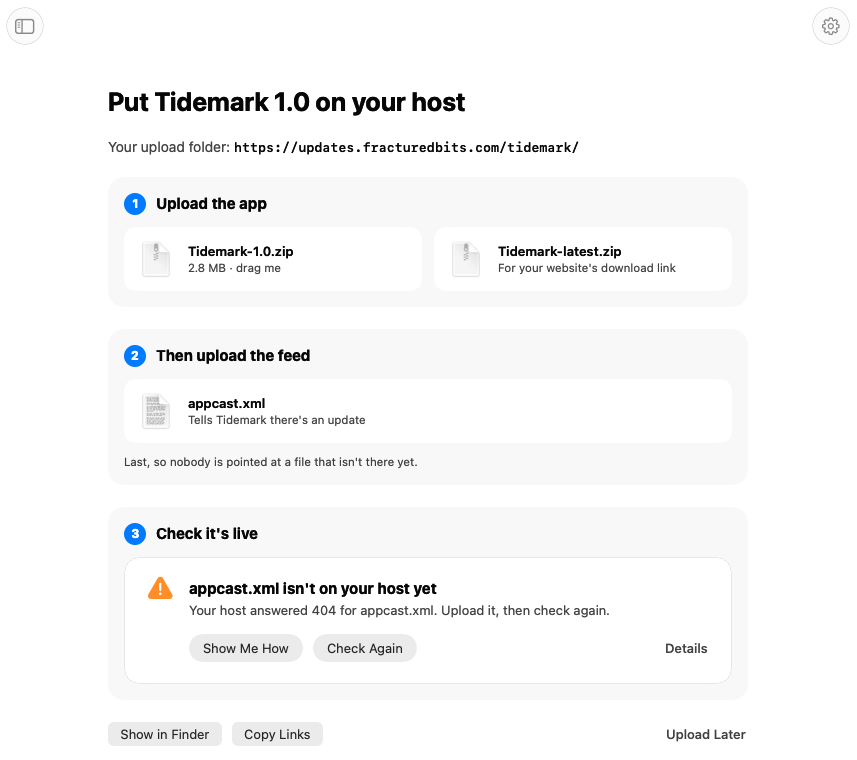
Nobody gets a broken update while you fix things. A feed only lists releases that are live plus the one you're uploading, and the feed goes up last.
“… isn't on your host yet”
Your host answered something other than success for that file: usually 404 (not found), sometimes 403 (forbidden) or a server error. The card shows the code.
- 404: the file isn't at that address. Upload it to your update folder, and check the folder's name and spelling match exactly, including capitals.
- 403: the file may be there but isn't public. Make sure the folder can be read by anyone, with no login or browser challenge in front of it.
- 5xx: your host had a problem. Wait a moment and click Check Again.
“… is one folder too high”
The file was uploaded next to your update folder instead of inside it. On S3 and CloudFront this reads “… is at the top of your bucket”. Move or upload the release's files into the folder the card names, then check again.
“The appcast.xml on your host isn't a feed”
Something answered at the feed's address, but it isn't a Sparkle feed. Most often it's an HTML page: an error page, a login, a “checking your browser” challenge, or a different file uploaded under the same name. Details says what HarborPilot found.
Upload the appcast.xml HarborPilot made, and make sure nothing sits in front of your update folder that a browser would have to click through. Sparkle can't get past those either.
“Your host still shows the old update”
Your feed is there, but it doesn't list the new version yet. There are two causes, and the card tells you which one it thinks it is:
- A saved copy. A cache in front of your host, such as Cloudflare's or CloudFront's, is still serving the previous
appcast.xml. Clear the cached feed, then check again. On Cloudflare, that's Caching → Configuration → Purge Cache → Custom Purge with the feed's full address. Your app files are fine. - The old file. The new
appcast.xmldidn't replace the old one. Upload it again, then check again.
To stop this happening, serve appcast.xml with Cache-Control: no-cache, or make a cache rule that doesn't cache it. HarborPilot sets that header when it uploads to Cloudflare; with FTP, your web server decides, so check its settings. Archives never change once they're uploaded, so they can be cached for as long as you like.
“… isn't the file HarborPilot made”
The file on your host has a different size or checksum from the one HarborPilot built and signed. Sparkle would refuse it, because the signature in the feed wouldn't match.
- Upload the file again from the release folder. Show in Finder on the Upload screen opens it.
- If you use an FTP app, make sure it uploads in binary mode, not ASCII.
- If it's
-latest.zipbehind a cache, the cache may still hold the previous release's copy. Clear it and check again.
“HarborPilot couldn't reach …”
HarborPilot couldn't connect to your host at all: no internet connection, a name that doesn't resolve yet, or a secure connection that failed. Nothing was changed. Check your connection and click Check Again.
If the address is brand new, its certificate may still be on its way. Some networks also block particular hosts; if other sites work, try another network.
When an automatic upload fails
With Cloudflare or FTP set up, HarborPilot uploads before it checks. If an upload fails, its card has Try Again. Files that already went up stay there, and the rest go up next time.
HarborPilot never replaces a release's archive. If a different file already has that name on your host, the upload stops and says so, rather than overwriting something people may already be downloading. See uploading with Cloudflare or FTP for more.
Coming back to it later
You don't have to fix it now. Upload Later takes you home, where your app shows “… isn't live yet” with Upload Files to pick up where you left off. History has Upload Files… for any release that isn't live, too. Each opens the same screen and the same check.
If you only changed release notes or removed a release, your app's home offers Update Feed… instead. It stages a fresh appcast.xml, and the check that follows looks at the feed and the newest release's archive.

Simplify your next release with HarborPilot.
Most failed checks come down to a file in the wrong folder or a cached feed. HarborPilot tells you which, so a release is live in minutes rather than after a round of support emails.
Sources and further reading
Service limits and Apple requirements can change. Check the linked documentation before publishing. HarborPilot is not affiliated with Apple, Cloudflare, or the Sparkle project.