Security · HarborPilot
Sparkle updates for sandboxed apps
A sandboxed app can't replace itself, so Sparkle installs updates through helper services that the sandbox has to be told about. Without those settings, people download updates that never install, and nothing tells them why. HarborPilot adds the settings for you and checks them before every release. This guide follows Bowline, a sample sandboxed app.
By Francisco Cantu ·
What a sandboxed app needs
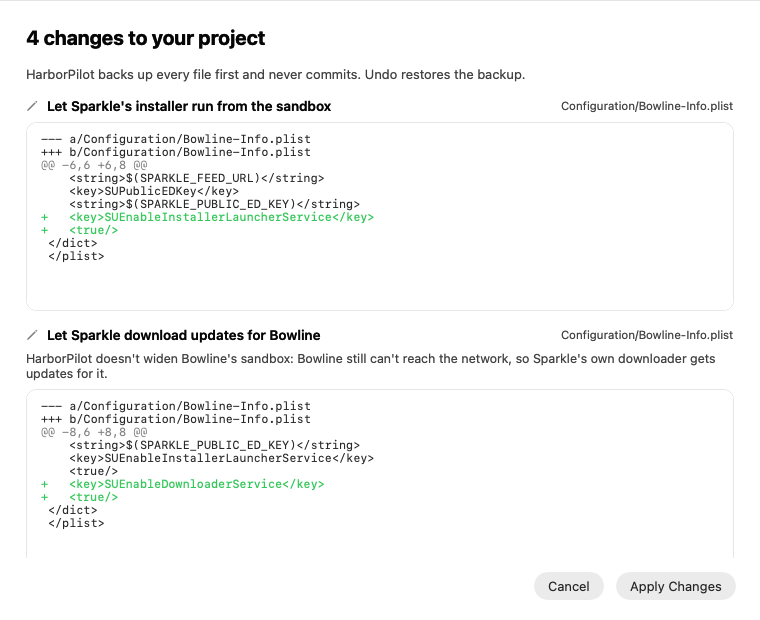
SUEnableInstallerLauncherServicein the Info.plist, so Sparkle can start its installer from the sandbox.- Two mach-lookup exceptions in the entitlements, for
$(PRODUCT_BUNDLE_IDENTIFIER)-spksand-spki, so the app can reach the installer and see its progress. HarborPilot keeps them as variables, so they follow a bundle identifier change. SUEnableDownloaderService, only if your app has no outgoing network access, so Sparkle can download updates on its behalf.
These come from Sparkle's sandboxing guide. They reach only Sparkle's own installer; nothing else in your app's sandbox changes.
New apps: Set Up adds them
When you connect a sandboxed app that doesn't have Sparkle yet, Set Up includes a step called Updates in the sandbox. Each setting is its own change in Review Changes, so you can read exactly what's added.
If your app is sandboxed only through Xcode's App Sandbox setting, with no entitlements file, HarborPilot creates Configuration/Bowline.entitlements with just the exceptions and points the target at it. Xcode merges it with the sandbox setting when it builds.
Check My Setup then shows Updates can install from the sandbox. The getting-started guide walks through Set Up.
Apps already set up: the release stops
If a sandboxed app already uses Sparkle but is missing any of these settings, it still connects as usual. Its home says it needs Sparkle's sandbox settings, and a release stops before building with “Bowline can't install updates yet”.
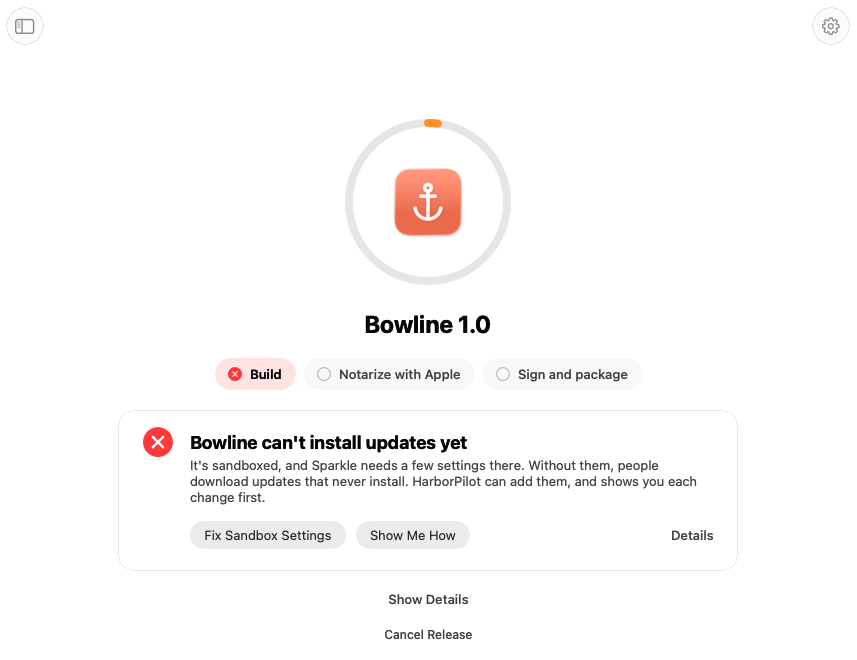
Click Fix Sandbox Settings. HarborPilot shows each change first, and applies them when you click Apply Changes. It backs up every file for Undo, and the stopped release goes on by itself.
There's no button to release anyway. A copy that can't install updates can't be fixed later, because the fix itself would never install.
Why HarborPilot doesn't add network access
If your app has the outgoing network entitlement, Sparkle downloads updates itself and HarborPilot leaves it alone. If it doesn't, HarborPilot turns on Sparkle's downloader service instead of giving your app network access. A release tool shouldn't widen your app's sandbox. If your app does need the network for its own features, turn on Outgoing Connections in Xcode yourself.
Projects HarborPilot can't edit
HarborPilot shows the steps instead of editing when:
- the project is generated by a tool such as XcodeGen or Tuist, which would overwrite the edits;
- Sparkle comes from CocoaPods or Carthage;
- an Info.plist or entitlements file isn't a plain property list.
The release stop then offers Show Me How and Try Again. Add the settings in your project's source, then try again.
If you add Sparkle with Swift Package Manager, use the mach-lookup exceptions, as Set Up does. Don't turn on SUEnableInstallerConnectionService or SUEnableInstallerStatusService: Sparkle's Swift package doesn't include the services those keys need, and Sparkle won't start without them.
Checked twice before Apple sees it
HarborPilot checks the project before building, then checks the exported app itself: its Info.plist, its entitlements, and that every service Sparkle will look for is inside Sparkle.framework. If anything's missing, the release stops with “The built Bowline can't install updates”, and nothing is sent to Apple.

Simplify your next release with HarborPilot.
Test one real update on a sandboxed app before you rely on it: install a release, ship the next one, and let Sparkle install it. If it works once, it keeps working.
Sources and further reading
Service limits and Apple requirements can change. Check the linked documentation before publishing. HarborPilot is not affiliated with Apple, Cloudflare, or the Sparkle project.