Getting started · HarborPilot
Connecting an app that already ships with Sparkle
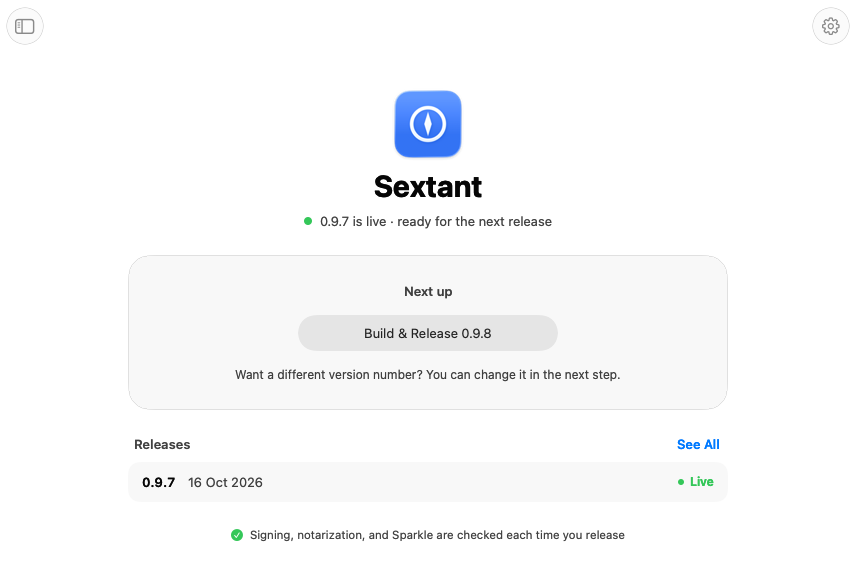
If your app already updates with Sparkle, there's nothing to set up. HarborPilot reads your project, finds your update key, and imports your live feed, so your next release continues where your last one left off. This guide follows Sextant, a sample app whose version 0.9.7 is already live at https://updates.fracturedbits.com/sextant/.
By Francisco Cantu ·
What “already set up” means
HarborPilot treats an app as set up when it already has Sparkle, an update address (SUFeedURL), and a public update key (SUPublicEDKey). Those apps skip Set Up entirely.
If one of the three is missing, HarborPilot offers Set Up instead, filled in with what it found, such as your existing feed address. The getting-started guide covers that path.
1. Connect the project
Drop your .xcodeproj or .xcworkspace on HarborPilot, or click Choose Project…. HarborPilot reads the project without building or changing it, then shows “Connecting Sextant…” while it does two things:
- Finds your update key. It looks through the Sparkle keys in your Keychain for the one that matches your app's
SUPublicEDKey, including keys you made with Sparkle's own tools before HarborPilot. macOS may ask permission for HarborPilot to read it. - Imports your live feed. It downloads the feed at your update address and saves every item in it with the app.
2. Check what was imported
Click See All to open History. Imported releases show as “Imported · live”. HarborPilot keeps them in your feed byte for byte, with their notes, download addresses, and signatures untouched, so nobody's update changes because you switched tools.
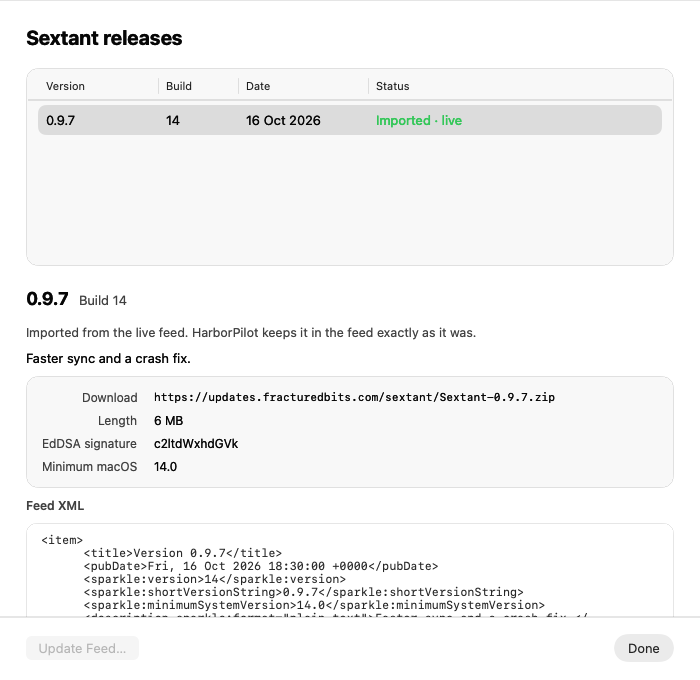
Releases you make with HarborPilot appear above them and can be edited. Imported items are read-only.
3. Your next build number
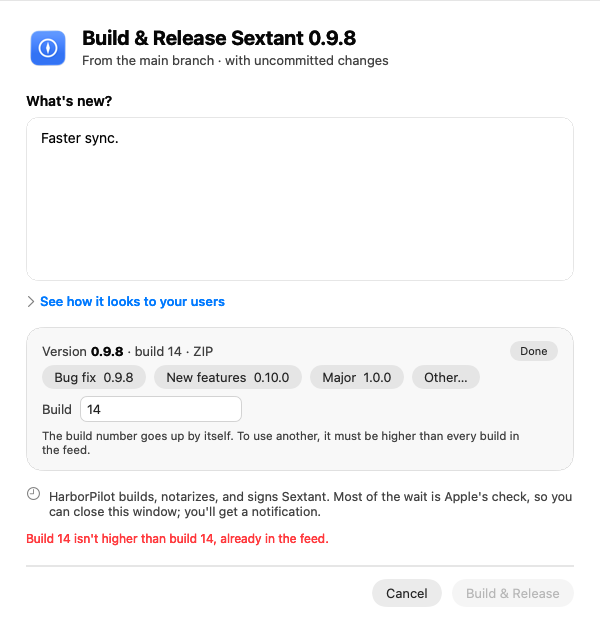
Sparkle decides what's newer by build number, so HarborPilot numbers each new release above everything already in your feed. The first build it suggests is the highest build in the feed plus one.
You can type a build yourself in the release sheet, but it has to be higher than every build already in the feed. If it isn't, HarborPilot says so before anything is built.
4. Make your first release
From here, a release is the same as for any app. Write the notes, click Build & Release, and upload. The new feed lists your imported items plus the new release. See shipping your next update for the full walkthrough.
Upload the new files to the same folder your feed already uses. HarborPilot's live check confirms they're where your app looks for them.
If something doesn't connect
- “Sextant's update key isn't on this Mac”: no key in your Keychain matches the app's public key. Click Restore from Backup… and choose the backup you saved, or Check Again after adding it another way. See your update key and moving to a new Mac.
- “HarborPilot couldn't read Sextant's live feed”: the address didn't answer with a feed. Try Again reads it again, and Import from a File… takes your
appcast.xmlas it is on your host. - A feed address with nothing published yet is fine: HarborPilot connects with nothing to import, and your first build is 1.
- “Sextant is already in HarborPilot”: each app connects once, however it's reached. To build it with a different scheme or configuration, change them in its settings.
What's locked after your first release
Once HarborPilot makes its first release of your app, it records the bundle identifier, the update key, and the feed address. Every copy people have installed depends on those three, so HarborPilot stops a release if any of them changes in Xcode and tells you what it was before.
The upload folder and feed address are also read-only in App Settings from then on, so a change can't leave people's copies looking in the old place. A Beta track with its own separate feed isn't pinned this way, but where a track goes can't be changed once it's added: remove the track and add it again instead.

Simplify your next release with HarborPilot.
Your users never notice the switch. Their copies keep checking the same address, signed with the same key, and the next update simply arrives.
Sources and further reading
Service limits and Apple requirements can change. Check the linked documentation before publishing. HarborPilot is not affiliated with Apple, Cloudflare, or the Sparkle project.